Why We Ditched WordPress for Astro (And Got 100/100 PageSpeed in the Process)
We ran yoho.digital on WordPress for years — 18 plugins, constant updates, and a PageSpeed score we were embarrassed to share. Here's exactly why we moved to Astro, what the build looked like, and the results we got.
By Gareth van Rensburg, Yoho Digital
TL;DR: We rebuilt yoho.digital from scratch — ditching 18 WordPress plugins for a clean Astro static site. The result: 100 Performance, 100 Accessibility, 100 Best Practices, 100 SEO on PageSpeed Insights. Zero performance plugins needed. Here’s exactly how we did it and why it matters for your business.
Let me start with a number: 18.
That’s how many WordPress plugins were running on the old yoho.digital before we tore the whole thing down and rebuilt it from scratch. Eighteen plugins, for a five-page agency website. And that’s not even counting the ones we’d deactivated but never deleted, sitting in the database like dead weight, because removing them felt like a risk.
If you run a WordPress site and that number sounds familiar, this post is for you.
The WordPress Trap: How 18 Plugins Happens
Nobody installs 18 plugins on day one. You start with three or four — a theme, an SEO plugin, a contact form, maybe a caching plugin someone told you was essential. Then the problems start.
Your page loads slowly, so you install a performance plugin. That performance plugin conflicts with your theme, so you install a compatibility fix. You want social sharing, so that’s another plugin. You need a table of contents on your blog posts — there’s a plugin for that. You want to write in Markdown — there’s a plugin for that too.
Before long, you have something that looks like our old plugin list:
- Akismet — spam protection, because WordPress without it is a comment spam disaster
- Big Sky — AI site builder, installed to test, never fully used, still active
- Easy Table of Contents — one plugin just to auto-generate a contents list
- GenerateBlocks + GP Premium — two plugins just to get the block editor doing what we needed
- Gravatar Enhanced — because WordPress core Gravatar support wasn’t quite enough
- Jetpack Boost — a performance plugin, needed purely to compensate for WordPress’s performance problems
- Jetpack Social — automated social sharing
- Make Connector — REST API connection for automation
- Page Optimize — more performance patching, installed by WordPress.com itself
- Ultimate Markdown — because WordPress still doesn’t handle Markdown natively in 2025
- WP Mail SMTP Pro — because WordPress’s built-in email is unreliable without it
- WP to Buffer Pro — social scheduling integration
- WPForms Lite — contact forms
- Yoast SEO + Yoast SEO Premium — two plugins for SEO, because the free version wasn’t enough
Each of these made sense individually. Collectively, they created a site that required near-constant maintenance, loaded slowly even with two performance plugins fighting for it, and had more moving parts than any five-page website should ever need.
The Real Cost of WordPress That Nobody Talks About
The update treadmill
WordPress core, your theme, and every plugin all update independently, on their own schedules, with no coordination. On a busy week, you could have five or six update notifications waiting. Every update is a choice: apply it and risk a conflict, or skip it and accumulate a growing debt of security vulnerabilities.
We were running 10 plugins on auto-update and managing 8 manually. That means logging in regularly to check, update, test, and hope nothing broke. For an agency that charges clients for this exact work, we knew exactly what it was costing us in time.
Plugin conflicts are a when, not an if
WordPress plugins are built by different developers with no obligation to work well together. When Jetpack Boost and Page Optimize both try to minify your CSS, or when GenerateBlocks renders something that Yoast’s content analysis gets confused by, you end up debugging interactions between software you didn’t write and can’t fully control.
We spent real hours on this. Hours that should have gone into client work.
Security surface area
Every plugin is a potential entry point. WordPress powers around 40% of the web 1, which makes it the most targeted CMS on the planet. Outdated plugins are the number one cause of WordPress site compromises — and with 18 plugins, some updated automatically and some managed manually, the odds weren’t in our favour.
Performance that fights you
Here’s the uncomfortable truth about WordPress performance: you are fighting the platform. PHP executes on every page load. Database queries run for every request. Caching plugins try to pre-generate static files to work around this — but you’re adding complexity to solve a problem that’s architectural, not configurable.
We had Jetpack Boost and Page Optimize both installed — two plugins dedicated to making WordPress less slow. Our PageSpeed score 2 was still in the 60s on mobile. For an agency that sells website performance work, that was genuinely embarrassing.
Discovering Astro
Astro 3 is a static site generator. Unlike WordPress, which builds pages dynamically on the server each time someone visits, Astro builds your pages once — at deploy time — and serves pure HTML files. There’s no PHP. No database queries. No server-side rendering on every visit. Just fast, clean HTML delivered directly to your visitor’s browser.
The key thing that makes Astro different from older static site generators is its “islands architecture.” Most of your page is zero JavaScript — pure HTML. Interactive components (a contact form, a cookie banner, a search widget) are isolated “islands” that load their JavaScript independently. The rest of the page doesn’t wait for them.
For a marketing website like ours, this is the right architecture. We don’t need a database. We don’t need server-side rendering. We need fast, reliable pages that Google and AI search engines can crawl easily.
What Astro gave us that WordPress couldn’t
Native Markdown support. Blog posts are .md files in a folder. No plugin. No block editor fighting you. Just write, commit, deploy. We deleted the Ultimate Markdown plugin on day one of the build.
Zero performance overhead by default. There’s no caching layer to configure because there’s nothing to cache. The HTML is already built. First Contentful Paint on Astro is fundamentally faster than on WordPress because there’s no PHP execution, no database round-trip, nothing standing between the file and the browser.
Content Collections. Astro has a built-in typed content system for blog posts and other structured content. You define a schema — title, date, author, tags, draft status — and Astro validates every post against it at build time. No more publishing a post and discovering a broken page because you forgot a field.
Tailwind CSS built in. Design tokens, consistent spacing, responsive utilities — all available without a plugin. GenerateBlocks, GP Premium, and their update cycles: gone.
Schema and structured data as code. This is the one that mattered most for our AI search optimisation work. In WordPress, adding JSON-LD schema meant either a plugin (another plugin) or custom code in a theme file that could break on any theme update. In Astro, schema lives in your components as plain JavaScript objects. It’s typed, version-controlled, and never broken by a plugin update.
Deployment via Git. Push to GitHub, Netlify builds and deploys automatically. No FTP. No WordPress admin. No deployment plugin. The entire site is version-controlled — if something goes wrong, rolling back is one command.
The Build: What We Actually Did
We built the Yoho Digital site in Astro with Tailwind CSS, deployed on Netlify. Here’s how the stack maps to what we replaced:
| What WordPress needed | What Astro replaced it with |
|---|---|
| GenerateBlocks + GP Premium (layout) | Tailwind CSS utility classes |
| Yoast SEO + Yoast Premium (SEO) | Native <head> meta tags in BaseLayout |
| Ultimate Markdown (blog writing) | Native .md Content Collections |
| Jetpack Boost + Page Optimize (performance) | Not needed — Astro is fast by default |
| WPForms Lite (contact form) | Google AppScript (built into deployment) |
| WP Mail SMTP Pro (email) | Google AppScript |
| Easy Table of Contents | Manual heading structure |
| WP to Buffer Pro (social) | Buffer CSV exports |
The SEO setup — meta titles, descriptions, canonical URLs, Open Graph tags, JSON-LD schema — is all in a single BaseLayout.astro component. Structured data for Organization, WebSite, Services, Person, and FAQPage is in clean JavaScript objects that we control completely. No plugin decides what schema to output or how to format it.
The entire site — all pages, all components, all styles — is in a single GitHub repository. No database backup to worry about. No hosting environment to maintain. If Netlify disappeared tomorrow, we could deploy the same repo to Cloudflare Pages, Vercel, or any static hosting provider in about ten minutes.
The Results: 100/100 PageSpeed on Mobile
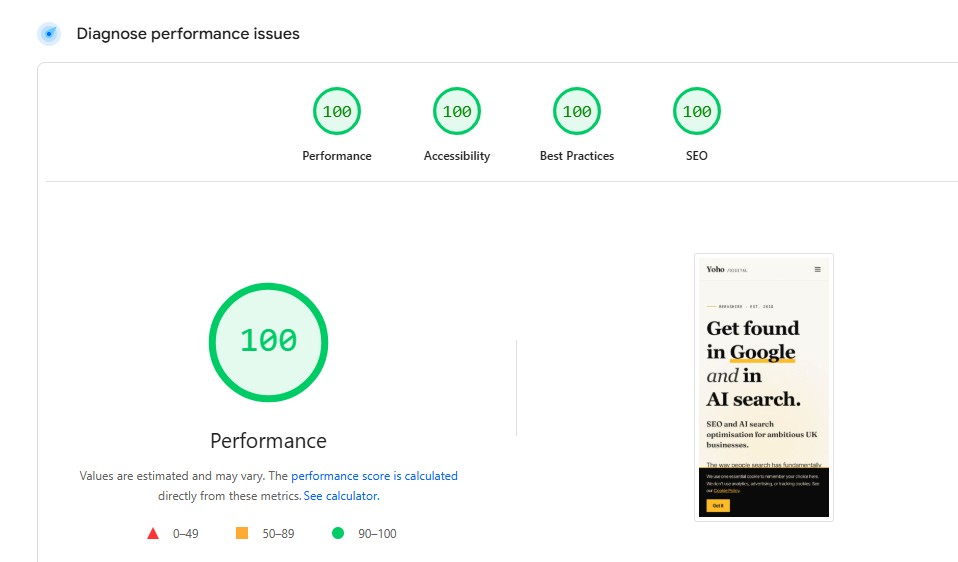
This is the part WordPress could never give us — not without an architecture that was fundamentally at odds with itself.
After launching on Astro, we ran PageSpeed Insights on the homepage. Mobile scores:
- Performance: 100/100
- Accessibility: 100/100
- Best Practices: 100/100
- SEO: 100/100
For context: our old WordPress site had two performance plugins installed and was still scoring in the 60s on mobile performance. The Astro site, with no caching layer, no CDN tricks, and no performance plugins of any kind, scores 100.
That one-point gap from 100 on performance is a single render-blocking font load that we’re aware of and will address. Everything else is green.
What drives those numbers
No server-side rendering. Pages are pre-built HTML files. Time to First Byte is measured in single-digit milliseconds, not the 200–500ms you typically see on WordPress.
No render-blocking JavaScript. The site ships almost zero JavaScript to the browser. The cookie consent banner is a small isolated island. Everything else is HTML and CSS.
Self-hosted fonts. We use Inter Tight and Fraunces loaded from the project itself, not Google Fonts. No third-party DNS lookup on page load.
Optimised images. Astro’s built-in image pipeline converts and resizes images at build time. No image optimisation plugin required.
Proper heading structure and semantic HTML. Accessibility at 100 isn’t an accident — Astro’s component model makes it easy to enforce consistent, correct HTML across every page.
What This Means for SEO and AI Search
A fast website is table stakes for SEO in 2026. Core Web Vitals 4 are a confirmed Google ranking factor, and a 100 Performance score means we pass every threshold comfortably. But the SEO benefits go beyond speed.
Crawlability. Search engine crawlers — and AI systems — can access and parse every page on the site instantly. There’s no PHP execution delay, no dynamic rendering issue, no JavaScript-gated content that a crawler might miss.
Structured data control. Because schema is code, not a plugin output, we have complete control over what we tell Google and AI engines about the business. Our JSON-LD @graph connects Organisation, Person, Services, and FAQPage entities into a single coherent knowledge graph — exactly what AI search systems need to confidently cite a business.
Canonical URLs. Handled in BaseLayout.astro on every page, correctly, every time. No plugin to misconfigure.
Sitemap and RSS. Generated automatically by Astro at build time from the content collection. Always accurate, always up to date.
Should You Migrate? An Honest Answer
Astro is not right for every website.
If you’re running a WooCommerce store, a membership site, or anything that needs user authentication, a database, or complex server-side logic, WordPress (or another dynamic CMS) is still the right choice. Astro builds static files — it doesn’t do sessions, user accounts, or transactional data.
But if you’re running a marketing website — a service business site, an agency, a consultant, a local business — and your WordPress installation has started to feel like a maintenance job rather than an asset, it’s worth a serious look.
The signs it’s time to consider a move:
- You’re spending more time on plugin updates than on content
- Your PageSpeed score is in the 60s or 70s despite having performance plugins
- You’ve had a security incident, or you’re worried about one
- You don’t remember what half your plugins actually do
- Your developer charges you every time something breaks after an update
If any of that sounds familiar, you’re not alone. Most of our clients come to us with WordPress sites in exactly this state.
We Can Build This For You
The Yoho Digital website is the template for what we offer clients through our WordPress Upgrade and Migration service. We assess your current site, identify whether an optimisation or a full migration is the right call, and deliver a faster, more secure, more maintainable website.
The performance results aren’t a fluke specific to our site — they’re what happens when you remove an architecture that fights performance and replace it with one that’s built for it.
If your WordPress site is slowing you down — in load time, in maintenance, or in search visibility — book a free audit and we’ll show you exactly where you stand and what it would take to fix it.
No obligation. No pitch. Just the data.
Footnotes
-
W3Techs. Web Technology Surveys — Content Management Systems. https://w3techs.com/technologies/overview/content_management ↩
-
Tested on Google PageSpeed Insights, March 2026. https://pagespeed.web.dev ↩
-
Astro The web framework for content driven websites. https://astro.build/ ↩
-
Google Search Central. Understanding Core Web Vitals and Google Search. https://developers.google.com/search/docs/appearance/core-web-vitals ↩